
In this article, we will look at how to completely disable system logging on Linux host (including /var/log, journald, and bash command history).
If you try to disable writing to the /var/log directory using the chmod 000 attribute, this will only work until the host is rebooted. Linux will then reassign the directory 755 permission.
The chattr +i attribute can be used to deny directory changes:
$ sudo chattr +i /var/logAfter the reboot, Linux processes will no longer be able to write to the /var/log directory, which will be empty.
In this case, when installing packages using apt manager, various errors will occur (can be fixed by adding the Dir::Log "/yourpath" parameter to apt.conf.d).
However, you can still read the logs written by the kernel and applications via systemd:
$ journalctl -fTo disable journalctl logs, edit the /etc/systemd/journald.conf:
Storage=none
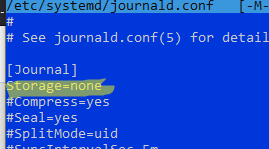
$ sudo journalctl --rotate && sudo journalctl --vacuum-time=1sRestart the service and delete the remaining logs:
$ sudo systemctl restart systemd-journald
$ rm -R /run/log/journal/*
$ sudo rm -R /var/log/journal/*
If you now use the command
$ journalctl -fIt will return:
No journal files were found

If you have rsyslog installed on your Linux host, you will also need to disable it:
$ sudo systemctl stop rsyslog
$ sudo systemctl disable rsyslog
Now delete the .bash_history file:
$ cat /dev/null > ~/.bash_history
$ sudo chattr +i ~/.bash_history
$ history -c && history -w``
Or you can add the option to .bashrc:
HISTSIZE=0
Why $ before commands? Inexperienced users will copy and paste even them in the terminal 😐.
If Someone Is so ignorant tò don’t know what $ Means, It Is sign that he does not deserve the blessing tò use gnu/Linux.
@me
Save your rude attitude for yourself, could instead have used the energy to give a short and respectful reply helping to address the question.
@Luca:
The dollar sign $ is commonly used in Linux literature to represent the command prompt for a regular user in shell environments. It indicates that the following text is a command that can be executed in the terminal.
With other words the dollar sign itself is never used.