
The systemd journal is the primary logging tool in modern Linux distros. The journald daemon intercepts all system messages via /dev/syslog, the /run/systemd/journal/stdout socket, and a few other paths. The journalctl tool is used to view systemd logs.
By default, journald will overwrite logs on each reboot if the /var/log/journal directory doesn’t exist. In this case, logs are written to /run/log/journal, which are cleared on reboot. In some cases, the size of the systemd journal may grow uncontrollably, resulting in a lack of free disk space.
To find out how much space systemd logs take up on disk, run:
$ journalctl --disk-usageArchived and active journals take up 392.0M in the file system.

You can also find out the size of the systemd logs by checking the size of the following directory using the du command:
$ du -sh /var/log/journal/To rotate journal log files, mark active logs as archived:
$ journalctl --rotateTrim archive logs to a specific size:
$ sudo journalctl --vacuum-size=264M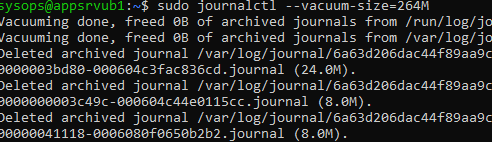
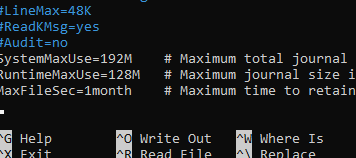
You can set limits on the maximum size and depth of systemd journals in the /etc/systemd/journald.conf configuration file. By default, all settings are commented out. Let’s set the following restrictions to the maximum journald log size:
$ sudo nano /etc/systemd/journald.conf[Journal]
SystemMaxUse=192M # Maximum total journal size
RuntimeMaxUse=128M # Maximum journal size in temporary storage
MaxFileSec=1month # Maximum time to retain log files
The SystemKeepFree parameter lets you set a minimum amount of free disk space. Systemd automatically truncates logs to free up space when free disk space falls below this threshold.
SystemKeepFree=100G
Storage=none parameter completely disables journalctl logging. Restart the journald service to apply the new settings:
$ sudo systemctl force-reload systemd-journaldRe-check the journal size
$ journalctl --disk-usage
The perspective outlined regarding “Configure systemd (journald) log size in Linux” provides meaningful clarity on the subject. The point made about “The systemd journal is the primary logging tool in modern Linux distros” is especially compelling and adds practical depth to the discourse. Equally noteworthy is the consideration around “The journald daemon intercepts all system messages via /dev/syslog, the”, which adds substantial value to the piece. Thank you for sharing such a constructive piece—definitely a valuable reference for anyone following this field.