
Rebooting a Linux device can happen for several reasons. This could be a normal restart of the operating system by the user, an automatic installation of updates, kernel panics, physical hardware failures, software errors, or a power failure.
If your Linux server has rebooted unplanned, there are several ways to find out why and check the cause.
Get operating system boot time:
$ who -bsystem boot 2023-10-26 09:07
You can also use the last command to display information about host reboots:
$ last -x | head | tacList of recent Linux reboots from the logs:
$ journalctl --list-boots
Or the entire reboot history:
$ last rebootTo find out the reasons for a particular restart, run the command
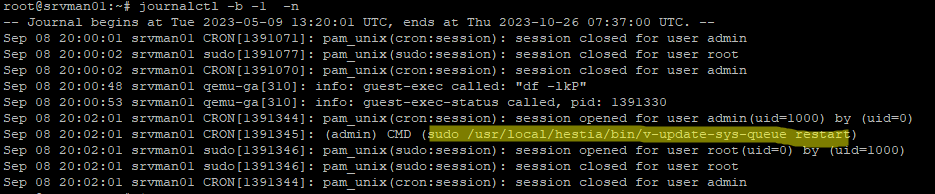
$ journalctl -b {num}-nReplace {num} with the entry index in the output of journalctl –list-boots command.
In my example, you can see that the reboot of the host has been initiated by a cron job that performs an automatic update of the HestiaCP web panel.
In some cases, you may need to analyze log files to get information about why Linux rebooted.
- CentOS/RHEL/Rocky/Oracle Linux –/var/log/message
- Ubuntu/Debian – /var/log/syslog
To quickly find the reasons for the reboot in the system logs, use the following bash script:
$ sudo grep -iv ': starting\|kernel: .*: Power Button\|watching system buttons\|Stopped Cleaning Up\|Started Crash recovery kernel' \
 /var/log/messages /var/log/syslog /var/log/apcupsd* \
 | grep -iw 'recover[a-z]*\|power[a-z]*\|shut[a-z ]*down\|rsyslogd\|ups'
In my example, the log contained the following line
systemd[1]: Started Unattended Upgrades Shutdown.
This means that automatic unattended upgrading is enabled for this Ubuntu host (you can disable it as follows).
Even for technical topics, I like how clear guidance matters, similar to vadhdivas shubhechha in marathi where messages are simple but meaningful. I recently adapted a traditional blessing for a family birthday and it felt sincere. A practical tip: break complex steps into short, clear points so readers can quickly find the answer they need.
Even straightforward explanations benefit from clarity, much like happy birthday wishes in marathi text where simple words still carry warmth and meaning. I recently adapted a traditional blessing for a family birthday and it felt sincere. A practical tip: list common causes in plain language first, then guide readers step by step toward checking logs for the exact reason.
Clear command examples make troubleshooting easier, much like happy birthday wishes in marathi where structure and sincerity go hand in hand.
I recently adapted a traditional blessing for a family birthday and it felt sincere. A practical tip: briefly explain what each command output means so readers can interpret the reboot time with confidence.
I appreciate how you break down the steps clearly, much like marathi birthday wishes keep messages simple yet meaningful. I recently adapted a traditional blessing for a family birthday and it felt sincere. A practical tip: after showing the boot time, guide readers to check system logs next so they can connect the timestamp with the actual cause.